Share links to channels and messages
You can share links to Mattermost channels and messages with other Mattermost users.
Share channel links
Sharing channel links makes it easy for others to find and join channels. To share a link to a channel, type ~ into the message text box, then select the channel you want to link to. If you're a member of multiple teams, only channels for the current team are listed.
Share message links
- Web/Desktop
- Mobile
Sharing message links displays a preview of the message in the post. To share links to messages in Mattermost, select the More  icon next to a message, then select Copy Link.

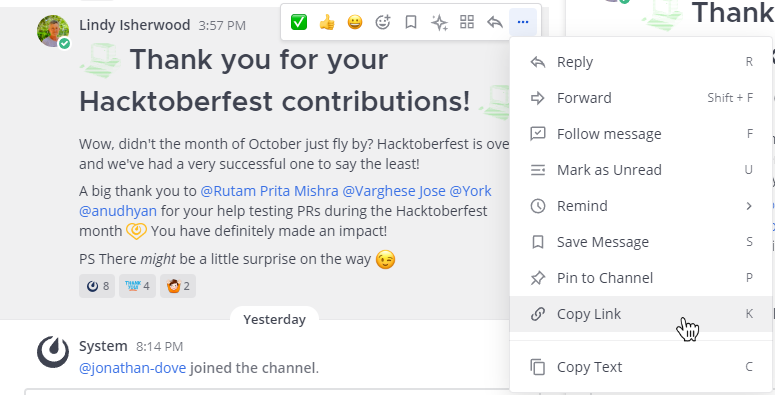
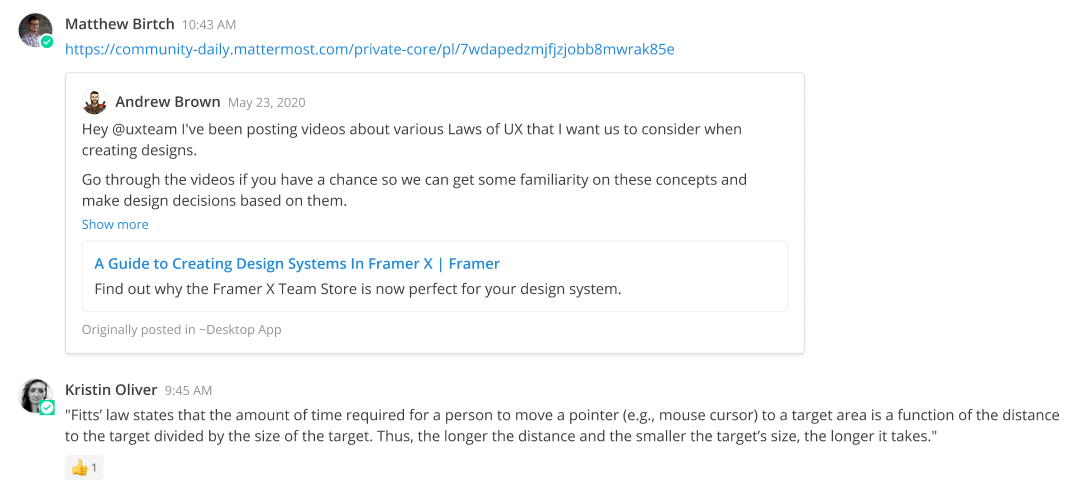
Paste the link into a message to share the image link with others. Sharing links to messages generates a preview of the message.
Long press a message, and then tap Copy Link to copy the link to the clipboard. Long press to paste the link as a message or reply. From mobile v2.23, sharing links to messages generates a preview of the message.
Deep links
Deep links are a powerful feature in Mattermost that allow you to create direct links to specific teams, channels, messages, or threads. These links can be used to quickly navigate to important content within Mattermost, enhancing collaboration and efficiency.
Deep links can also be used, in combination with bots, scripts, and integrations, to trigger specific actions within Mattermost.
From Mattermost v10.11, channel bookmarks containing mattermost:// open directly in the desktop app using deep linking. This turns channel bookmarks into one-click shortcuts that enable you jump straight to key assets in Mattermost quickly and easily.
Format deep links
Deep links must be formatted in Mattermost as follows:
- Deep link to a team:
mattermost://<your-Mattermost-server-URL>/<team-name> - Deep link to a channel:
mattermost://<your-Mattermost-server-URL>/<team-name>/channels/<channel-name> - Deep link to a channel message or thread:
mattermost://<your-Mattermost-server-URL>/<team-name>/pl/<post-id> - Deep link to a direct message:
mattermost://<your-Mattermost-server-URL>/<team-name>/messages/@<user-name>