Deploy Mattermost on Oracle Kubernetes Engine (OKE)
You can use the supported Oracle Cloud Marketplace listing, Mattermost - OCI-Native (Kubernetes-based), to deploy a high-availability Mattermost environment on Oracle Cloud Infrastructure (OCI). One guided stack provisions a new Oracle Kubernetes Engine (OKE) cluster, a managed OCI Database with PostgreSQL system, an Object Storage bucket for file attachments, the Mattermost Kubernetes Operator, and HTTPS ingress through the OCI Native Ingress Controller.
Before you begin
Before deploying, make sure you have the following:
- An Oracle Cloud tenancy and compartment you have permission to create resources in (VCN, OKE, IAM policies, OCI Database with PostgreSQL, Object Storage, Resource Manager)
- Sufficient service limits for a new OKE cluster and its default worker pool (3 nodes,
VM.Standard.E5.Flexat 2 OCPUs/16GB each) and for an OCI Database with PostgreSQL system - A registered domain name you can create a DNS
Arecord for, pointing to the Mattermost load balancer - A TLS certificate for that domain, imported into OCI Certificate Service, with its OCID ready before you deploy. The stack does not accept a raw PEM/private key, only a certificate OCID.
- A Mattermost Enterprise license if you plan to deploy for more than 100 users. Larger sizes run Mattermost and PostgreSQL in high-availability mode, which requires a license.
Installation steps
The installation process includes deploying Mattermost and configuring the necessary components.
Step 1: Start from Oracle Cloud Marketplace
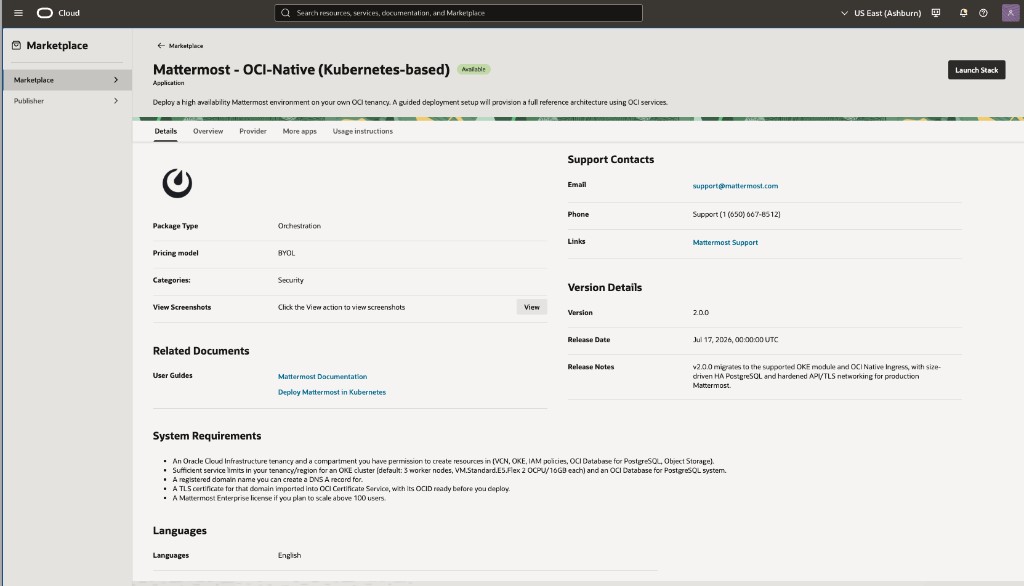
Go to the Mattermost - OCI-Native (Kubernetes-based) listing and select Launch Stack.
Step 2: Stack Information
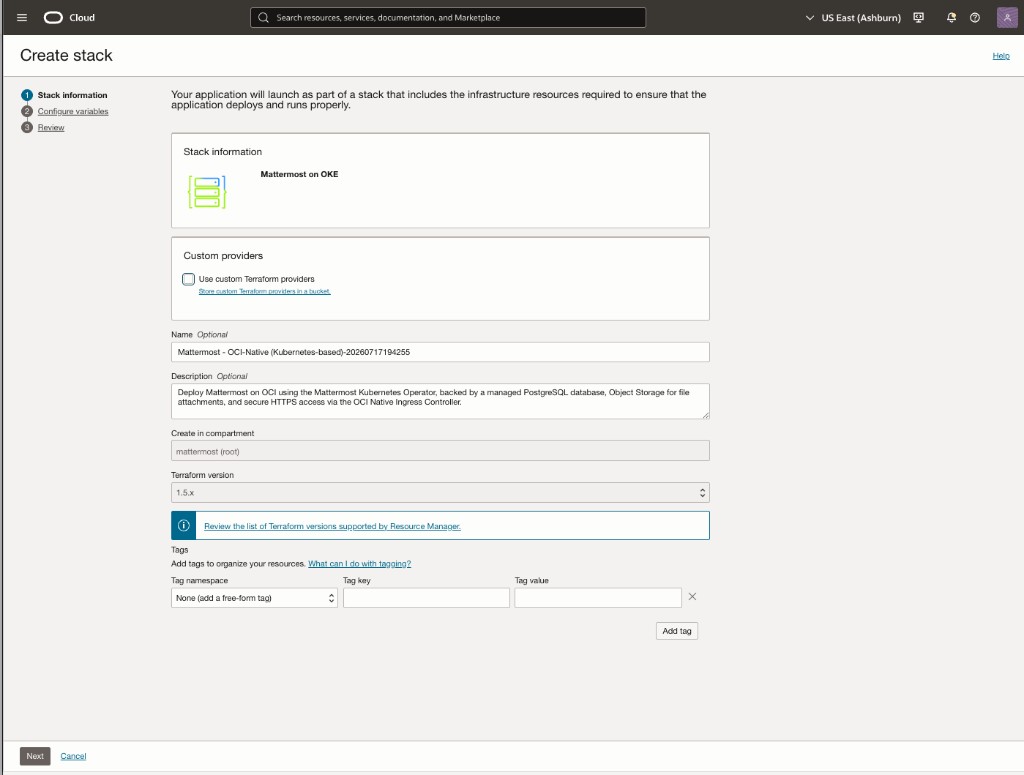
On the Create stack page, review the information, and then set the stack name, description, compartment, and Terraform version.
Step 3: Configure Variables
Set all the details for your Mattermost deployment. Variables are grouped by area; advanced groups are hidden behind a Show advanced options toggle so the default flow stays simple.
General Configuration
- Compartment:
- Target compartment for every resource the stack creates: the OKE cluster, VCN, PostgreSQL DB system, and Object Storage bucket.
- Cluster Name Prefix:
- Used as a prefix on all OCI resources created by the stack (default:
mattermost).
- Used as a prefix on all OCI resources created by the stack (default:
- Show Recovery Options:
- Leave off for a normal deployment. Only enable this if a previous apply failed and left resources blocking re-apply; it reveals a Deploy ID Revision field that forces new resource names.
Mattermost Installation
- Mattermost Installation Name:
- Name for this installation (default:
mattermost-prod).
- Name for this installation (default:
- Mattermost Installation Size:
- Choose the size that matches your expected active user count:
100users,1000users,5000users,10000users, or25000users(default:100users). This drives both the Mattermost pod resources and the PostgreSQL topology (instance count, shape). It's a create-time-only setting: changing it later requires deploying a new stack because OCI can't modify PostgreSQL topology in place. Sizes above 100 users deploy Mattermost and PostgreSQL in high-availability mode and require an Enterprise license.
- Choose the size that matches your expected active user count:
- Mattermost Version:
- The Mattermost server version to install.
- Mattermost License Key:
- Upload your Enterprise license file. Optional at
100users; leave empty to start unlicensed and add a license later from System Console > Edition and License. Required for every larger size.
- Upload your Enterprise license file. Optional at
- Mattermost FQDN:
- The hostname end users will browse to (for example,
mattermost.domain.com). You'll point its DNSArecord at the stack's output load balancer IP after deployment.
- The hostname end users will browse to (for example,
- OCI Certificate Service OCID:
- The OCID of the certificate you imported into OCI Certificate Service for that FQDN.
- Mattermost LB Allowed CIDR Blocks:
- IP ranges allowed to reach Mattermost over HTTPS. Default (
0.0.0.0/0) allows access from anywhere; restrict this for corporate or internal-only deployments.
- IP ranges allowed to reach Mattermost over HTTPS. Default (
- Show Advanced Mattermost Options:
- Turn this on to reveal the following fields, all of which have sensible defaults for most deployments:
- Kubernetes Namespace: The namespace Mattermost is installed into (default:
mattermost). - Helm Repository URL: Source of the Mattermost Operator Helm chart (default:
https://helm.mattermost.com). - Operator Helm Chart Version: Choose the Mattermost Operator Helm chart version to install from the list (default: the newest version offered).
- NIC Readiness Wait Timeout: How long to wait for the Native Ingress Controller to become ready before failing the apply (default: 180 seconds).
- Kubernetes Namespace: The namespace Mattermost is installed into (default:
- Turn this on to reveal the following fields, all of which have sensible defaults for most deployments:
OKE Configuration
- Kubernetes Version:
- Leave empty to auto-select the newest version OKE publishes.
- Worker OS Version:
- Oracle Linux
8or9(default:8).
- Oracle Linux
- Worker Count:
- Number of worker nodes in the cluster (default: 3, recommended for high availability). You can adjust this later by editing and re-applying the stack.
- Show Advanced OKE Options:
- Turn this on to reveal the following fields, all of which have sensible defaults for most deployments:
- Virtual Cloud Network (VCN) CIDR: IP address range for the cluster's network (default:
10.20.0.0/16). Only change this if it conflicts with an existing network you need to peer with. - API Endpoint Allowed CIDR Blocks: IP ranges allowed to reach the Kubernetes API (default:
0.0.0.0/0, i.e. anywhere). Restrict this to your corporate gateway or VPN range for tighter security. Make sure the range you choose covers your own admin access, since there's no bastion host as a fallback path. - Cluster CNI: The pod networking mode:
OCI_VCN_IP_NATIVE(default, recommended for better performance and tighter VCN integration) orFLANNEL_OVERLAY. - Worker Shape: Compute shape for each worker node (default:
VM.Standard.E5.Flexwith 2 OCPUs/16 GB memory), suitable for most Mattermost deployments. - Worker Pool Name: The name for the worker node pool as it appears in the OCI Console and CLI.
- Virtual Cloud Network (VCN) CIDR: IP address range for the cluster's network (default:
- Turn this on to reveal the following fields, all of which have sensible defaults for most deployments:
Cluster Tools
- Install Metrics Server:
- Enables
kubectl topand the metrics API HPA relies on, if you add your own autoscaler later. On by default; recommended for all deployments.
- Enables
- Create OKE IAM Policies:
- Automatically creates the IAM policies OKE needs to manage cluster resources. On by default; disable only if these policies already exist in your compartment.
PostgreSQL
- PostgreSQL Database Name / Description:
- The display name and description for the OCI Database with PostgreSQL system (separate from the Mattermost application database name below).
- PostgreSQL Major Version:
14,15,16, or17(default:16).
- PostgreSQL Admin Username / Password:
- Admin credentials for the DB system. Passwords must be 8–32 characters with at least one uppercase letter, one lowercase letter, one number, and one special character, and cannot contain single quotes, double quotes, backslashes, or semicolons.
- Mattermost Database Name / User / Password:
- The database, user, and password Mattermost itself connects with inside PostgreSQL (defaults:
mattermost/mmuser). The password follows the same rules as the PostgreSQL Admin Password above (8–32 characters, upper/lowercase, number, special character; no quotes, backslashes, or semicolons).
- The database, user, and password Mattermost itself connects with inside PostgreSQL (defaults:
- Create a Subnet for the Mattermost Database:
- On by default, to create a dedicated subnet for the DB system. Disable to select an existing subnet instead.
- PostgreSQL Backup Retention (Days):
- Automatic-backup retention, 7–35 days (default: 30).
- Show Advanced PostgreSQL Options:
- Turn this on to reveal the following fields, all of which have sensible defaults for most deployments:
- PostgreSQL Port: The port PostgreSQL listens on (default:
5432). - Backup Window: Daily UTC time window for automatic backups.
- Maintenance Window: Weekly UTC time window for maintenance operations.
- Per-Tier Overrides: Instance count, OCPUs, and memory overrides for each Mattermost Installation Size tier.
- PostgreSQL Port: The port PostgreSQL listens on (default:
- Turn this on to reveal the following fields, all of which have sensible defaults for most deployments:
Object Storage
- Bucket Compartment:
- Compartment for the Object Storage bucket. Defaults to the main compartment.
- Object Storage Bucket Name:
- Name of the bucket used to store Mattermost file attachments.
Tagging
- Tag Resources:
- Optionally apply OCI free-form or defined tags to every resource the stack creates.
Step 4: Review and Apply
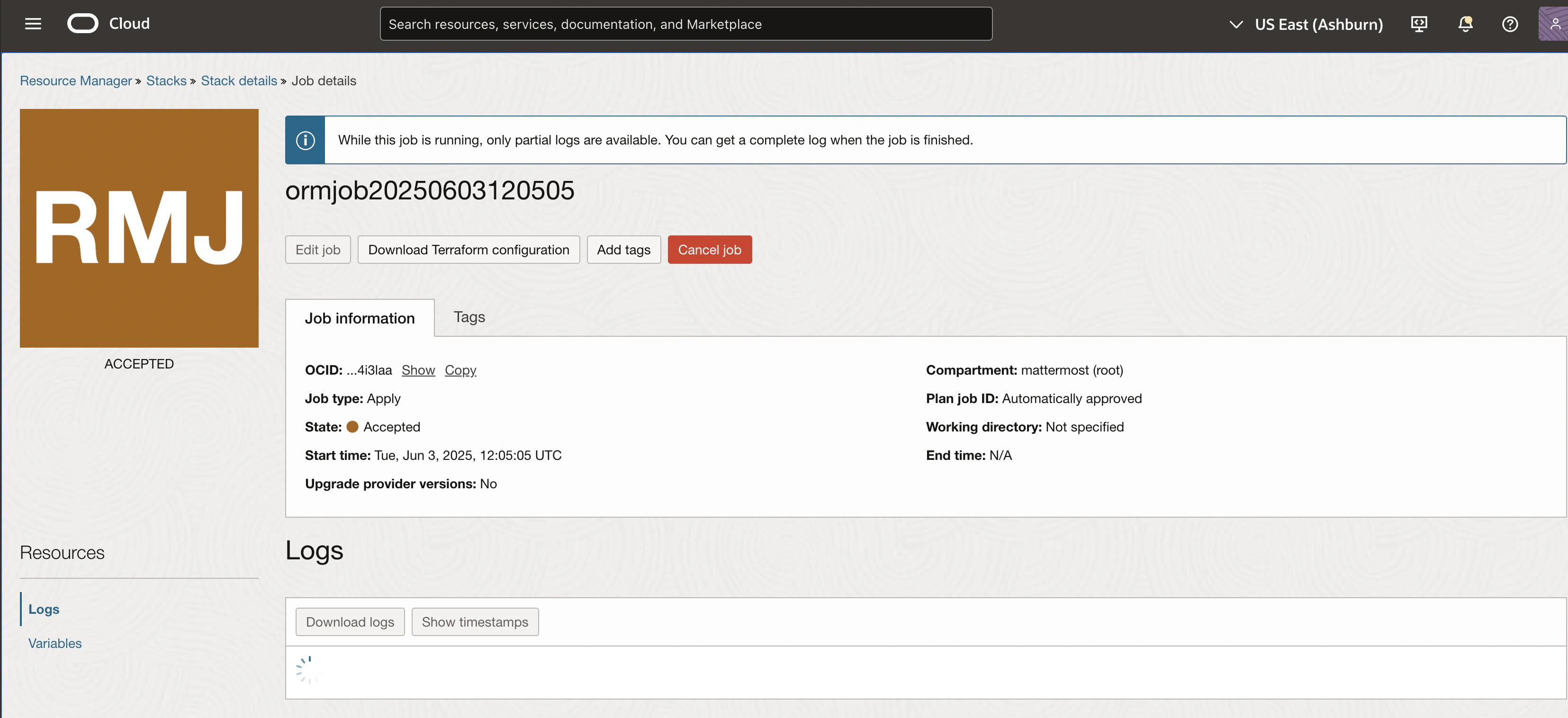
Check all your settings and select Create to start the deployment. Monitor the Resource Manager job and logs. The first apply takes about 30 minutes.
Step 5: After Deployment
When the job finishes, open the stack's Application information tab to review the deployment details:
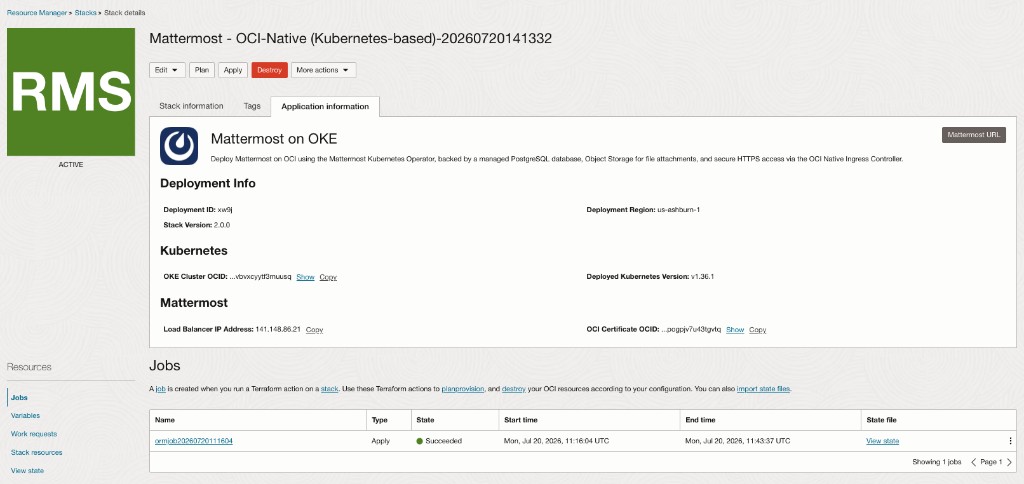
- Load Balancer IP Address: Copy the IP shown beside this label and create a DNS
Arecord from your Mattermost FQDN to it. This reserved OCI Public IP stays stable across re-applies. - Mattermost URL (top-right button): The public HTTPS URL, reachable once DNS propagates.
- OKE Cluster OCID and Deployed Kubernetes Version: Identify the OKE cluster if you need to connect with
kubectlor the OCI CLI.
Once the A record resolves, open your browser and go to the Mattermost URL.
Step 6: Upgrade Mattermost
To upgrade your Mattermost installation:
- Go to your Resource Manager stack and select Edit.
- Update the Mattermost Version variable to the target release.
- Save and run Plan, then Apply.
The Native Ingress Controller uses Pod Readiness Gates to hold new pods out of rotation until their OCI load balancer backend reports healthy. On an HA-sized installation (above 100users, multiple Mattermost replicas), this minimizes disruption during the rollout since other replicas keep serving traffic. On the default 100users size, which runs a single replica, a brief interruption while that pod restarts is expected.
Common Errors and How to Avoid Them
- Error: Stack creation fails with missing permissions
- Cause: IAM policies are not set properly for the user or group running the stack.
- Solution: Ensure you have permissions for Resource Manager, OKE, Networking, OCI Database with PostgreSQL, Object Storage, and Certificate Service.
- Error: Plan fails because a Mattermost license is required
- Cause: Mattermost Installation Size is set above
100userswithout a license uploaded; larger sizes deploy in high-availability mode, which is Enterprise-licensed. - Solution: Upload a valid Mattermost Enterprise license, or choose
100users.
- Cause: Mattermost Installation Size is set above
- Error: Mattermost URL doesn't resolve after deployment
- Cause: The DNS
Arecord for your FQDN hasn't been created yet, or hasn't propagated. - Solution: Create an
Arecord from your Mattermost FQDN to themattermost_lb_ipoutput, then wait for DNS propagation.
- Cause: The DNS
- Error: Certificate OCID rejected or ingress never becomes healthy
- Cause: The OCI Certificate Service OCID doesn't exist, isn't in the same tenancy, or doesn't match the configured FQDN.
- Solution: Re-check the certificate in OCI Certificate Service and confirm the OCID was copied correctly.
- Error: PostgreSQL password rejected
- Cause: The PostgreSQL Admin Password or Mattermost Database Password doesn't meet the required complexity rules (8–32 characters, upper/lowercase, number, special character; no quotes, backslashes, or semicolons).
- Solution: Re-enter a password that satisfies the pattern shown in the field description.
- Error: Terraform destroy fails on the PostgreSQL system or the bucket
- Cause: The database system has destroy protection enabled by design, and OCI refuses to delete a non-empty Object Storage bucket.
- Solution: Empty the bucket first, then disable the database's lifecycle protection before destroying.
Learn more about managing your Mattermost server in the Administration Guide.