Backing storage benchmarks
Understanding the performance characteristics of your backing storage is critical for optimizing your Mattermost deployment. These benchmarks offer insights into the relative performance of each storage option, helping you make informed decisions based on your use case and infrastructure needs.
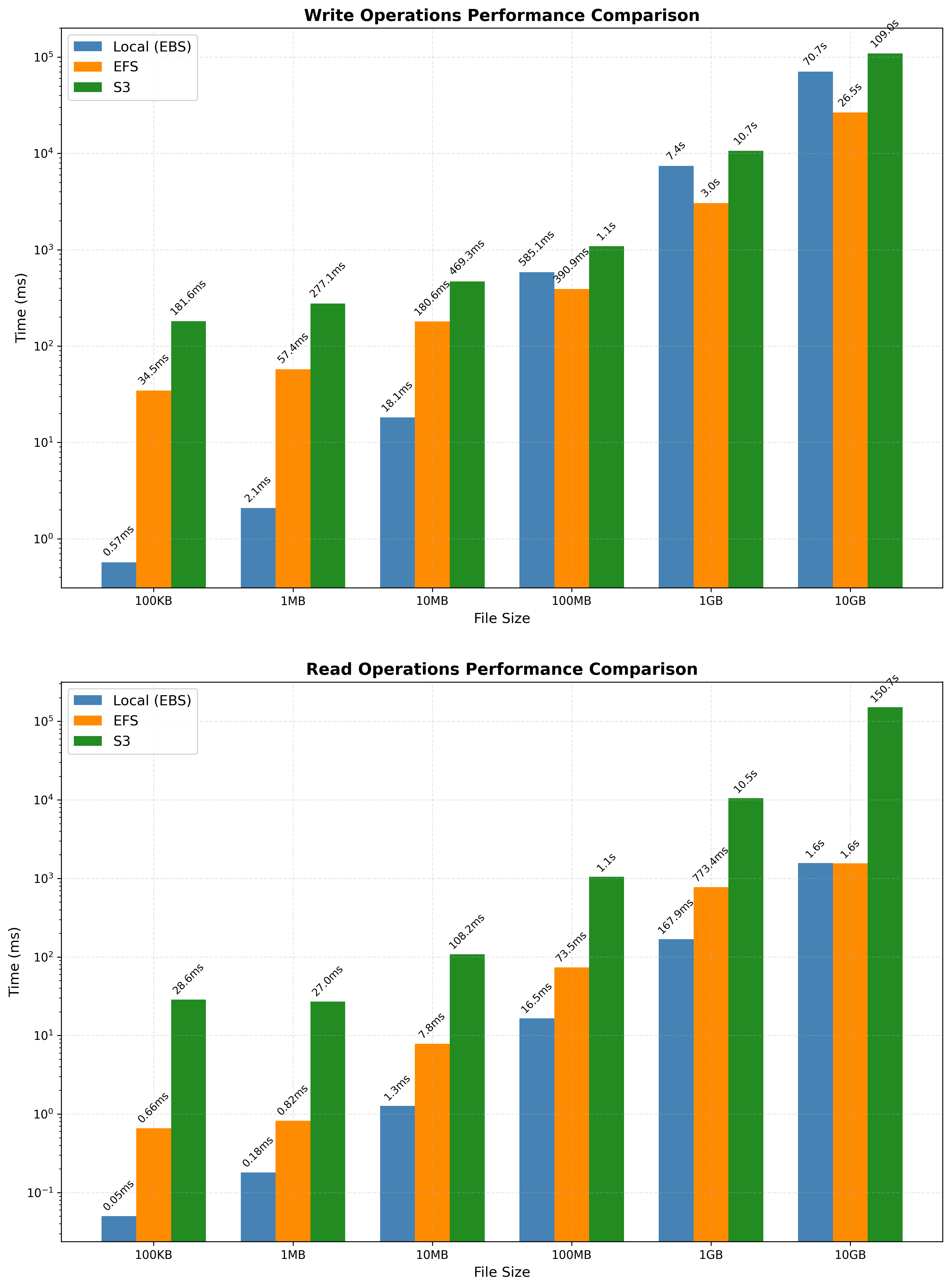
This page provides detailed write and read benchmark results for supported storage options including local file system (EBS, gp3), network file system (EFS), and object storage (S3).
Write operations
| File Size | Local (EBS) | EFS | S3 |
|---|---|---|---|
| 100KB | 0.57 ms (±0.26 ms, p50: 0.63 ms) | 34.47 ms (±6.33 ms, p50: 32.57 ms) | 181.59 ms (±39.05 ms, p50: 174.83 ms) |
| 1MB | 2.08 ms (±0.92 ms, p50: 2.28 ms) | 57.43 ms (±7.32 ms, p50: 58.16 ms) | 277.13 ms (±49.95 ms, p50: 279.36 ms) |
| 10MB | 18.15 ms (±5.31 ms, p50: 18.23 ms) | 180.58 ms (±97.95 ms, p50: 150.35 ms) | 469.29 ms (±166.32 ms, p50: 462.12 ms) |
| 100MB | 585.14 ms (±274.38 ms, p50: 795.78 ms) | 390.87 ms (±166.32 ms, p50: 339.20 ms) | 1.09 s (±0.04 s, p50: 1.09 s) |
| 1GB | 7.42 s (±2.13 s, p50: 7.99 s) | 3.05 s (±1.09 s, p50: 2.93 s) | 10.65 s (±0.82 s, p50: 10.44 s) |
| 10GB | 70.66 s (±7.05 s, p50: 80.50 s) | 26.54 s (±2.47 s, p50: 26.86 s) | 109.05 s (±12.47 s, p50: 105.13 s) |
Read operations
| File Size | Local (EBS) | EFS | S3 |
|---|---|---|---|
| 100KB | 0.05 ms (±0.02 ms, p50: 0.04 ms) | 0.66 ms (±0.17 ms, p50: 0.60 ms) | 28.55 ms (±4.12 ms, p50: 27.63 ms) |
| 1MB | 0.18 ms (±0.06 ms, p50: 0.18 ms) | 0.82 ms (±0.19 ms, p50: 0.72 ms) | 27.03 ms (±4.28 ms, p50: 27.54 ms) |
| 10MB | 1.27 ms (±0.27 ms, p50: 1.16 ms) | 7.83 ms (±18.12 ms, p50: 1.68 ms) | 108.24 ms (±0.56 ms, p50: 108.18 ms) |
| 100MB | 16.50 ms (±0.95 ms, p50: 16.16 ms) | 73.53 ms (±182.32 ms, p50: 16.91 ms) | 1.05 s (±0.00 s, p50: 1.05 s) |
| 1GB | 167.89 ms (±2.19 ms, p50: 167.72 ms) | 773.41 ms (±1768.89 ms p50: 168.17 ms) | 10.49 s (±0.02 s, p50: 10.49 s) |
| 10GB | 1.57 s (±0.03 s, p50: 1.56 s) | 1.56 s (±0.02 s, p50: 1.55 s) | 150.66 s (±33.47 s, p50: 146.51 s) |
Testing notes
- For S3 tests, Amazon S3 exported upload part size was set to the default value (100MB).
- Local EBS storage is the stock gp3 (3000 IOPS) provided by EC2 instances.
- Both EBS and EFS solutions tested are considered
localstorage options from the application's perspective, where the file storage system is set tolocalin both cases. EFS is essentially AWS's managed NFS, which enables it to serve as a potential alternative to S3 by allowing multiple Mattermost nodes in a high-availability (HA) deployment to share a common file system. In such HA scenarios, the standard local file storage (e.g., an EBS volume attached to a single instance) is not suitable, as it can't be shared across multiple nodes. EFS is a good alternative in this case, but EFS is not a block storage solution like EBS.
Supported storage options
Local
The local file system of the Mattermost server. If running in a cloud environment like AWS, this often utilizes Elastic Block Storage (EBS), which provides block-level storage attached directly to the instances. This setup typically offers high performance with low latency since the storage is local to the server. This option is often the fastest for small files due to low latency.
EFS
Amazon Elastic File System, a managed file storage solution that supports shared access across multiple instances. EFS supports shared access across multiple instances but adds network overhead, which can impact performance compared to local storage options. EFS is generally slower than local storage but can be beneficial for certain use cases requiring shared access.
S3
Amazon Simple Storage Service, an object storage solution that provides high durability and scalability. While S3 is great for storing large amounts of data reliably, it introduces higher latency and slower performance due to network-based access and its nature as object storage rather than block or file storage.